Collection Files
In Stoker, you define "collections" for your data. In other systems, these might be referred to as "tables", "objects" or "entities".
Each collection represents a collection in Cloud Firestore, and a page in the Admin UI.
Each collection in stoker has its own file in src/collections.
The following are the options for each collection file.
You can use application state and the Web and Node SDKs in your config files.
The config each collection file returns is shared between tenants. Always read tenant-scoped values inside a method or a hook.
General Collection Config
labels
{ collection: string, record: string }
These are the names for the collection. Collection names must start with a capital letter and contain only letters, digits, and underscores. You can provide a user-friendly set of labels in admin.titles.
collection: The name for the collection, i.e. "Clients".
record: The name for a record in the collection, i.e. "Client".
recordTitleField
string
The field in the collection that will be used as the record's title i.e. "Name".
auth
boolean
Set to true if this collection is a "users" collection.
When set to true, records in the collection can be assigned access credentials.
singleton
boolean
Set to true if the collection will only have one record / page i.e. "Settings"
When set to true, no list page will be shown in the Admin UI. The user will be sent straight to the form page for the single record in the collection.
parentCollection
string
This is an advanced option. Set to the collection's parent collection if this collection will be a subcollection in Firestore. Subcollections are not currently supported in the Admin UI.
softDelete
{ archivedField: string, timestampField: string, retentionPeriod: number }
Enable soft-delete for this collection.
archivedField: Provide the name of a Boolean field. This field will be set to true when the record is soft-deleted.
timestampField: Provide the name of a Timestamp field. This field will be set to the current time when the record is soft-deleted.
retentionPeriod: The number of days after which soft-deleted records will be permananently deleted.
fullTextSearch
string[]
An array of field names. These fields will be searchable.
For collections without preloadCache or serverReadOnly set to true, you will need to set up Algolia. Steps:
- Create an Algolia application for your app.
- Create an index for the collection in your Algolia app, using the exact collection name.
- Set searchable attributes for your index (in the "Configuration" section of the index). These attributes should match the fields provided to
fullTextSearch. - Set facets for your index (in the "Configuration" section of the index). The
tenant_idattribute is required. You will also need to add any fields that your app uses to query records in the collection. This usually means:- The "Archived" field if your collection has soft delete enabled.
- All fields used for filters in the admin app. So, if your app filters the collection by "Status", add a "Status" attribute to the facets section. For ManyToOne / ManyToMany relation filters, append "_Array" to the end of the field name (for example, "Project_Array"). For OneToOne / OneToMany relation filters, use "Field_Single.id" (for example, "Project_Single.id").
- All fields used for attribute restrictions.
relationLists
{
    collection: string
    field: string
    roles?: string[]
    loadAll?: boolean
    constraints?: [string, "==" | "in", unknown][]
    showMetrics?: boolean
    showFilters?: string[]
}[]
Define "child lists" that will appear in the Admin UI for records in this collection.
For example, a "Clients" collection might have lists of related "Sites", "Quotes" and "Invoices" on its record page.
| Property | Type | Description |
|---|---|---|
collection | string | The collection for the relation list. |
field | string | The field in the current collection that relates to the collection above. |
roles | string[] | The roles that can see this relation list. |
loadAll | boolean | When preloadCache.range is enabled, setting this option will ignore the range restrictions and load all records available for the relation list. |
constraints | [string, "==" | "in", unknown][] | Firestore constraints to apply to the relation list query. |
showMetrics | boolean | Show metrics above the list in the Admin UI. |
showFilters | string[] | A list of filters to show in the LHS sidebar when the relation list is active. |
enableWriteLog
boolean
Set to true to enable the write log for this collection. Every write to a record will be logged in Firestore, creating a history that can be used for data recovery and audit purposes.
Each write log entry can store up to four copies of a record (the submitted data, the original record, and the final record and final original record verified by the server). To keep write log entries within Firestore's 1MB document size limit, records in collections with the write log enabled are limited to 256KB.
preserveWriteLog
boolean
Set to true to preserve write log entries for deleted records. If this option is not enabled, all write log entries for a record will be deleted on record delete.
indexExemption
boolean
Set to true to exempt this collection from Firestore indexing. Indexes that are reqiuried for your app to function will be re-added automatically. This feature improves performance and reduces costs by minimizing the number of indexes in your database. However, it may prevent you from running queries outside of the standard queries used by your app, for example when performing manual back end data operations.
roleSystemFields
{ field: string, roles?: string[] }[]
By default, the following system fields are not accessible to your app's users:
Created_AtSaved_AtCreated_ByLast_Write_AtLast_Save_AtLast_Write_ByLast_Write_AppLast_Write_Connection_StatusLast_Write_Version
You can make them accessible by defining an array of objects containing the name of a field and the roles that can access that field.
Saved_At and Last_Save_At are safely generated on the server. Created_At and Last_Write_At are set on the client, and may not be reliable. The purpose of these fields is to log when offline writes occurred.
fieldAccessGroups
Record<string, FieldAccessCondition>
Named groups of fields that are only visible when a condition is met for the current user. Use this when a static role list on field.access is not enough — for example when visibility depends on auth token claims.
Define the groups on the collection, then reference them from fields with access: { group: "Group-Key" }.
fieldAccessGroups: {
    "Private-Notes": {
        applicableRoles: ["Admin", "User"],
        match: "any",
        roles: ["Admin"],
        claims: { Private_Notes_Access: true },
    },
},
fields: [
    {
        name: "Private_Field",
        type: "Map",
        access: { group: "Private-Notes" },
    },
]
In this example, Admins always see the field, and standard Users see it only when their auth token has Private_Notes_Access: true.
Group keys
Keys must start with a letter and contain only letters, digits, and hyphens. They must not end with a hyphen followed by digits (for example Notes-1).
FieldAccessCondition
| Property | Type | Description |
|---|---|---|
applicableRoles | string[] | Required. Roles that this group can ever apply to. The user's role must be in this list or access is denied. |
match | "any" | "all" | How to combine the checks below. Required when more than one of collectionAuth, roles, claims, or restrictions is set. |
collectionAuth | boolean | Require the user's collection auth permission to equal this value. |
roles | string[] | The user's role must be one of these. |
claims | Record<string, scalar | scalar[]> | Auth token claim checks. A scalar requires equality; an array requires the claim to be one of the listed values. All entries must match. |
restrictions | object | Required state of this collection's permission restrictions for the current user. All provided entries must match. See below. |
restrictions may include:
recordOwner: collection Record Owner restriction must equal thisrecordUser: collection Record User restriction must equal thisrecordProperty: collection Record Property restriction must equal thisrestrictEntities: collection entity restrictions must equal this
At least one of collectionAuth, roles, claims, or restrictions is required.
allowSchemalessFields
boolean
Set to true to allow fields that are not defined in the schema to be written to records in the collection.
ttl
string
The name of a Timestamp field containing an automatic deletion date for the record i.e. "Expires_At"
Denormalized data is not currently deleted by TTL policies, making it unsuitable for deleting data for privacy purposes.
skipRulesValidation
boolean
Collections with many fields may hit the limit of 1000 expressions per request allowed by Firestore Security Rules. If you see this error you can set this property to true to skip rule validation of writes. Validation will be run post-write in a Cloud Function, and you will get an email if invalid data is submitted.
This option can be set at the field-level if you only want to skip rule validation for a subset of fields.
Alternatively, you can set access.serverWriteOnly to true. This will force all writes to go through the server, validating all fields. The downside of this method is that your app will not be able to perform offline writes.
seedOrder
number
The priority of this collection when seeding test data using stoker seed-data.
queries
{
    field: string
    range?: boolean
    standalone?: boolean
    roles?: string[]
}[]
This is an advanced option that is only relevant if you are using Stoker as a headless CMS. This option is handled automatically by the Admin UI.
Define fields that will be indexed for querying.
| Property | Type | Description |
|---|---|---|
field | string | The name of the field. |
range | boolean | Set to true if the field is a Timestamp field. |
standalone | boolean | Set to true if the field needs to be indexed independently of sorting. |
roles | string[] | The user roles that will run the query. |
custom.autoCorrectUnique
boolean | (() => boolean | Promise<boolean>)
Return true to automatically rename duplicate records rather than throwing an error.
Only relevant when access.serverWriteOnly is falsy.
custom.disableOfflineCreate
boolean | (() => boolean | Promise<boolean>)
Return true to disable adding new records while offline.
custom.disableOfflineUpdate
boolean | (() => boolean | Promise<boolean>)
Return true to disable updating records while offline.
custom.disableOfflineDelete
boolean | (() => boolean | Promise<boolean>)
Return true to disable deleting records while offline.
Collection Access Config
Access config is specified using the access property.
serverReadOnly
string[]
An array of roles that must read data via the server. This allows more granular access control (specified in serverAccess at the collection or field level).
This option slows performance and removes offline and realtime capabilities, so it is not recommended unless you absolutely need more granular access control.
serverWriteOnly
boolean
Set to true to force writes through the server.
This option is required if your collection has fields that perform two-way relation writes.
This option is automatically enabled for collections with auth set to true.
The above scenarios aside, we do not recommend enabling this option as it slows performance and removes offline write capabilities.
On the other hand, this option can greatly reduce the amount of Firestore Security Rules used by the collection. If you are exceeding the 256KB rules limit, you might consider enabling this option for collections that don't require offline writes.
operations
{
    assignable?: boolean | string[]
    read?: string[]
    create?: string[]
    update?: string[]
    delete?: string[]
}
Define which roles can perform which CRUD operations for the collection.
| Property | Type | Description |
|---|---|---|
assignable | boolean | string[] | Set to true or an array of user roles to allow disabling of access in the user's profile. |
read | string[] | Roles that can read records in the collection. |
create | string[] | Roles that can create records in the collection. |
update | string[] | Roles that can update records in the collection. |
delete | string[] | Roles that can delete records in the collection. |
auth
{ roles: string[] assignable?: string[] }
Only relevant when auth is set to true in the root collection config (above).
| Property | Type | Description |
|---|---|---|
roles | string[] | Roles that can be granted the ability to assign access credentials for this collection. Roles listed here but not in assignable are granted auth access automatically. |
assignable | string[] | Optional subset of roles for which auth can be enabled or disabled per user. |
If assignable is omitted, every role in roles is granted auth automatically.
Access Control Policies
Stoker allows you to set complex access control policies using simple config.
This config comes in the form of:
- "Attribute restrictions", which restrict a user's access to records with certain attributes.
- "Entity restrictions", where you explicitly define which specific records or groups of records can be accessed by a user. This assignment is done in the user's profile (by an Admin).
attributeRestrictions
Provide an array of the following attribute restrictions:
Record Owner Restriction
Users will only be able to access records that they created themselves.
type RecordOwnerRestriction = {
    type: "Record_Owner"
    roles: { role: string, assignable?: boolean }[]
    operations?: ("Read" | "Create" | "Update" | "Delete")[]
}
| Property | Type | Description |
|---|---|---|
roles | { role: string, assignable?: boolean }[] | The roles that this restriction applies to. If assignable is true, this restriction can be removed for individual users. |
operations | ("Read" | "Create" | "Update" | "Delete")[] | If provided, the restriction only applies to the listed operations. |
Record User Restriction
Users will only be able to access records that they have been assigned to.
For example, if the collection has an "Assigned To" field, the user will only be able to access the record if they have been added to that field.
type RecordUserRestriction = {
    type: "Record_User"
    roles: { role: string, assignable?: boolean }[]
    collectionField: string
    operations?: ("Read" | "Create" | "Update" | "Delete")[]
}
| Property | Type | Description |
|---|---|---|
collectionField | string | The field used to assign access. Must be a relational field linked to a users collection. |
roles | { role: string, assignable?: boolean }[] | The roles that this restriction applies to. If assignable is true, this restriction can be removed for individual users. |
operations | ("Read" | "Create" | "Update" | "Delete")[] | If provided, the restriction only applies to the listed operations. |
Record Property Restriction
Users will only be able to access records that have specified values for a selected field.
For example, if the collection has a "Status" field, you can ensure that a user role only sees "Not Started" and "In Progress" records, but not "Completed" or "Archived" records.
type RecordPropertyRestriction = {
    type: "Record_Property"
    roles: { role: string, assignable?: boolean, values: string[] }[]
    propertyField: string
    operations?: ("Read" | "Create" | "Update" | "Delete")[]
}
| Property | Type | Description |
|---|---|---|
propertyField | string | Must be a String field with values set. |
roles | { role: string, assignable?: boolean, values: string[] }[] | The roles this restriction applies to, and which property values they can access. If assignable is true, this restriction can be removed for individual users. |
operations | ("Read" | "Create" | "Update" | "Delete")[] | If provided, the restriction only applies to the listed operations. |
entityRestrictions.restrictions
Provide an array of the following entity restrictions:
Individual Entity Restriction
Assign individual records to a user in their profile.
type IndividualEntityRestriction = {
    type: "Individual"
    roles: { role: string }[]
    singleQuery?: number
}
| Property | Type | Description |
|---|---|---|
roles | { role: string }[] | The roles that this restriction applies to. |
singleQuery | number | Advanced. Force read operations to get all records in a single API call. |
Parent Entity Restriction
Assign all records for a parent record to a user in their profile. For example, you might assign a user "All Sites for Company X" or "All Tasks for Project X".
type ParentEntityRestriction  = {
    type: "Parent"
    roles: { role: string }[]
    collectionField: string
    singleQuery?: number
}
| Property | Type | Description |
|---|---|---|
collectionField | string | The field that parent records can be selected from. Must be a relational field. |
roles | { role: string }[] | The roles that this restriction applies to. |
singleQuery | number | Advanced. Force read operations to get all records in a single API call. |
Parent Property Entity Restriction
Assign all records for a parent record to a user in their profile, by attribute. For example, you might assign a user "All Sites for Company X in State NY" or "All Tasks for Project X assigned to Team B".
type ParentPropertyEntityRestriction = {
    type: "Parent_Property"
    roles: { role: string }[]
    collectionField: string
    propertyField: string
}
| Property | Type | Description |
|---|---|---|
collectionField | string | The field that parent records can be selected from. Must be a relational field. |
propertyField | string | The field that defines the attribute. |
roles | { role: string }[] | The roles that this restriction applies to. |
Soft-deleting assigned records does not block access to them. See softDelete.
entityRestrictions.assignable
string[]
An array of user roles for which entity restrictions can be disabled for individual users.
entityRestrictions.parentFilters
This section lets you apply entity restrictions from a parent collection onto a child collection.
For example, you could assign a user access to "All Jobs on Sites for Company X in State NY" or "All Subtasks on Tasks for Project X assigned to Team B".
Individual Entity Parent Filters
Assign an individual entity restriction from a parent collection.
type IndividualEntityParentFilter = {
    type: "Individual"
    collectionField: string
    roles: { role: string }[]
}
| Property | Type | Description |
|---|---|---|
collectionField | string | The relational field that links to the collection that the individual entity restriction is on. |
roles | { role: string }[] | The roles that this parent filter applies to. |
Parent Entity Parent Filters
Assign a parent entity restriction from a parent collection.
type ParentEntityParentFilter = {
    type: "Parent"
    collectionField: string
    parentCollectionField: string
    roles: { role: string }[]
}
| Property | Type | Description |
|---|---|---|
collectionField | string | The relational field that links to the collection that the individual entity restriction is on. |
parentCollectionField | string | The relational field that matches the parent entity restriction's collection field. |
roles | { role: string }[] | The roles that this parent filter applies to. |
Parent Property Entity Parent Filters
Assign a parent property entity restriction from a parent collection.
type ParentPropertyEntityParentFilter = {
    type: "Parent_Property"
    collectionField: string
    parentCollectionField: string
    parentPropertyField: string
    roles: { role: string }[]
}
| Property | Type | Description |
|---|---|---|
collectionField | string | The relational field that links to the collection that the individual entity restriction is on. |
parentCollectionField | string | The relational field that matches the parent entity restriction's collection field. |
parentPropertyField | string | The field that matches the parent entity restriction's property field. |
roles | { role: string }[] | The roles that this parent filter applies to. |
When parent filters are used, the collection and property fields used in entity restrictions and parent filters should have updates disabled using restrictUpdate. This is because you will likely be denormalizing data for these fields.
customSecurityRules
boolean
Set to true if you want to write custom Firestore Security Rules for the collection.
Custom security rules can be added at firebase-rules/firestore.custom.rules
You'll probably want to copy the generated security rules for modification before enabling this option.
customStorageRules
boolean
Set to true if you want to write custom Firestore Storage Rules for the collection.
You'll probably want to copy the generated security rules for modification before enabling this option.
permissionWriteRestrictions
permissionWriteRestriction[]
Stoker lets you restrict which permissions a user role can assign to other user roles. For example, imagine a scenario where you want:
- "Manager" users to be able to create any users with any permissions
- "Supervisors" to be able to create "Staff Member" users only. Additionally, Supervisors can only grant access to 3 selected collections and must apply certain attribute and entity restrictions on those collections.
This allows a flexible yet secure hierarchy of access assignment.
Your config should look like this:
type permissionWriteRestriction = {
    userRole: string
    recordRole: string
    collections: {
        collection: string
        operations: ("Read" | "Create" | "Update" | "Delete")[]
        attributeRestrictions?: ("Record_Owner", "Record_User", "Record_Property")[]
        restrictEntities?: boolean
        auth?: boolean
    }[]
}
| Property | Type | Description |
|---|---|---|
userRole | string | The user role you are applying restrictions to. |
recordRole | string | A role that the user above can assign access to. |
collections | object[] | Define which operations and restrictions are applied for each collection. |
files
AccessFiles
You can define access rules for file uploads.
Your config should look like this:
type AccessFiles = {
    assignment?: {
        [role: string]: {
            optional?: {
                read?: string[]
                update?: string[]
                delete?: string[]
            }
            required?: {
                read?: string[]
                update?: string[]
                delete?: string[]
            }
        }
    }
    metadata?: {
        [key: string]: string
    }
    customMetadata?: {
        [key: string]: string
    }
}
| Property | Type | Description |
|---|---|---|
assignment | object | Define the user roles that the user must assign access to for each file. |
metadata | Record<string, string> | Enforce Firebase Storage metadata constraints. |
customMetadata | Record<string, string> | Enforce custom metadata constraints. |
For example:
{
    assignment: {
        Client: {
            required: {
                read: ["Manager", "Supervisor"],
                update: ["Manager", "Supervisor"],
                delete: ["Manager"],
            }
        }
    },
    metadata: {
        size: " <= (5 * 1024 * 1024)",
        contentType: ' in ["application/octet-stream"]',
    },
    customMetadata: {
        collection: ' == "Work_Orders"',
    },
}
custom.serverAccess
{
    read?: (permissions: StokerPermissions, user: UserRecord, record?: StokerRecord) => boolean | Promise<boolean>
    create?: (permissions: StokerPermissions, user: UserRecord, record: StokerRecord) => boolean | Promise<boolean>
    update?: (permissions: StokerPermissions, user: UserRecord, record: StokerRecord, originalRecord?: StokerRecord) => boolean | Promise<boolean>
    delete?: (permissions: StokerPermissions, user: UserRecord, record: StokerRecord) => boolean | Promise<boolean>
}
Define additional access control using code on the server.
Only relevant if access.serverWriteOnly is set to true.
Return a boolean indicating whether or not the access check passed.
This code is not sent to the client.
Preload Cache Config
You can preload data for your collections on app startup. Preloaded data is cached and is available for the lifetime of the session.
Since Stoker is primarily designed for enterprise applications, long sessions are common. It is also common for users to download the app onto the desktop as a PWA.
Because long sessions are common, we encourage preloading data on app startup. This results in a snappy application that works offline thanks to cached data.
We absolutely recommend using the preload cache for time series data. This will result in huge performance gains, more available features and fewer indexes used. You don't have to preload huge amounts of data if you don't want to.
To enable preloading of data, use the preloadCache property.
For examples of this config, see the default Inbox and Outbox collections in your project (created by stoker init).
roles
string[]
An array of user roles that will use the preload cache.
relationCollections
boolean | (() => boolean | Promise<boolean>)
Whether to wait for related collections to load before signalling to the app that the collection is loaded.
range
PreloadCacheRange
Use this option to preload a range of time-series data. The user will be able to update the preloaded range using a date picker in the Admin UI.
type PreloadCacheRange = {
    fields: string[]
    ranges?: [string, string][]
    labels?: string[]
    start: "Today" | "Week" | "Month" | "Year" | Date | number
    startOffsetDays?: number
    startOffsetHours?: number
    end?: Date | number
    endOffsetDays?: number
    endOffsetHours?: number
    selector?: "range" | "week" | "month" | ("range" | "week" | "month")[]
}
| Property | Type | Description |
|---|---|---|
fields | string[] | Timestamp fields the user can preload by. |
ranges | [string, string][] | Ranges of fields to preload, for example ["Start", "End"]. Fields must also be listed in fields. |
labels | string[] | Human-readable labels for the fields listed above. |
start | "Today" | "Week" | "Month" | "Year" | Date | number | The default start date for the preloaded range. |
startOffsetDays | number | Offset the default start date by this many days. |
startOffsetHours | number | Offset the default start date by this many hours. |
end | Date | number | The default end date for the preloaded range. |
endOffsetDays | number | Offset the default end date by this many days. |
endOffsetHours | number | Offset the default end date by this many hours. |
selector | "range" | "week" | "month" | ("range" | "week" | "month")[] | Which selectors to show in the range picker. |
constraints
[string, WhereFilterOp, unknown][] | (() => [string, WhereFilterOp, unknown][] | Promise<[string, WhereFilterOp, unknown][]>)
Additional Firestore constraints to apply to the preload cache. This is an advanced option.
Collection Fields Config
Fields are specified using the fields property.
fields must be an array of field objects. These objects are outlined below.
General Field Properties
These properties can be set on any field type.
name
string
The name of the field. It must not have spaces (use underscores). You can set a human-readable name in admin.label.
access
string[] | { group: string }
Controls which users can access the field.
Provide an array of user roles for static access:
access: ["Administrator", "Management"]
Or reference a field access group for conditional access:
access: { group: "Ground-Notes" }
Omitting the access property altogether allows access by ALL roles.
restrictCreate
boolean | string[] | FieldAccessCondition
Set to true to prevent this field from being included when the record is created.
Alternatively, provide an array of user roles that CAN provide the field when creating a record, or provide a FieldAccessCondition for even more granular access control.
restrictUpdate
boolean | string[] | FieldAccessCondition
Set to true to prevent this field from being changed when the record is updated.
Alternatively, provide an array of user roles that CAN change the field when updating a record, or provide a FieldAccessCondition for even more granular access control.
required
boolean
Set to true if the field is a required field.
nullable
boolean
Set to true if the field is a nullable field.
sorting
boolean | { direction?: "asc" | "desc" roles?: string[] }
Specifies that this field will be used for sorting. Not required if all user roles have preloadCache or access.serverReadOnly enabled. In these cases, sorting is automatic.
Set to true to sort by "asc" and "desc" for all user roles, or provide the more granular config above.
Specifying a sorting direction for a field in a collection without preloadCache or serverReadOnly set to true will result in the "Previous" page button being disabled. The "Back to start" button will still work.
skipRulesValidation
Skip Firestore Security Rules validation for this field. This can help to keep the size of the security ruleset down. When this option is enabled, validation will be performed post-write in a Cloud Function. You will receive an email if invalid data has been submitted.
description
string | (() => string | Promise<string>)
A description for the field for LLMs. Only relevant if ai is configured.
singleFieldExemption
{
    queryScope: "COLLECTION" | "COLLECTION_GROUP"
    order?: "ASCENDING" | "DESCENDING"
    arrayConfig?: "CONTAINS" | "CONTAINS_ANY"
}
Place a single field exemption on the field in Firestore.
If you have set indexExemption at the collection level, this option will re-enable indexing for the field.
You should consider exempting incrementally increasing monotonic fields, large String fields, Map fields and Array fields.
saveToAuthToken
boolean
In auth collections, set to true to add the field to the linked user's auth token.
Be sure to control access to auth token fields using restrictCreate and restrictUpdate
custom.initialValue
unknown | ((record?: StokerRecord) => unknown | Promise<unknown>)
Calculate an initial value for this field when creating the record.
custom.serverAccess
{
    read?: (permissions: StokerPermissions, user: UserRecord, record?: StokerRecord) => boolean | Promise<boolean>
    create?: (permissions: StokerPermissions, user: UserRecord, record: StokerRecord) => boolean | Promise<boolean>
    update?: (permissions: StokerPermissions, user: UserRecord, record: StokerRecord, originalRecord?: StokerRecord) => boolean | Promise<boolean>
}
Define additional access control using code on the server.
Only relevant if access.serverWriteOnly is set to true.
Return a boolean indicating whether or not the access check passed.
This code is not sent to the client.
String Field Properties
type
"String"
values
string[]
An optional list of values. This will result in a dropdown list being shown in the Admin UI.
unique
Set to true to make the field a unique field. Be sparing with this option unless access.serverWriteOnly is set to true.
Case is ignored when determining whether or not a value is a duplicate.
You can auto-rename duplicate values in the Web SDK using custom.autoCorrectUnique. Note that this will append an identifier i.e. "DUPLICATE-1" to the end of the field value. Your field validation strategy will need to account for this identifier, or writes will be rejected.
Unique field values are NOT freed up when a record is soft-deleted.
length
number
Specify a fixed length for the field.
minlength
number
Specify a minimum length for the field.
maxlength
number
Specify a maximum length for the field.
pattern
string
Specify a regex pattern for the field.
email
boolean
Set to true if the field is an email address
Emails are currently only validated server-side if you have access.serverWriteOnly set to true. You can alternatively use pattern above, which is always validated server-side.
url
boolean
Set to true if the field is a url
URLs are currently only validated server-side if you have access.serverWriteOnly set to true. You can alternatively use pattern above, which is always validated server-side.
emoji
boolean
Set to true if the field is an emoji
Emojis are currently only validated server-side if you have access.serverWriteOnly set to true. You can alternatively use pattern above, which is always validated server-side.
uuid
boolean
Set to true if the field is a UUID
UUIDs are currently only validated server-side if you have access.serverWriteOnly set to true. You can alternatively use pattern above, which is always validated server-side.
ip
boolean
Set to true if the field is an IP address
IP addresses are currently only validated server-side if you have access.serverWriteOnly set to true. You can alternatively use pattern above, which is always validated server-side.
Number Field Properties
type
"Number"
values
number[]
An optional list of values. This will result in a dropdown list being shown in the Admin UI.
unique
Set to true to make the field a unique field. Be sparing with this option unless access.serverWriteOnly is set to true.
Unique field values are NOT freed up when a record is soft-deleted.
autoIncrement
boolean
Set to true to make the field an auto-incremented number.
Auto-incremented numbers are written by a Cloud Function after the record has been saved to the server. This means auto-incremented numbers made in offline mode won't appear until the user has reconnected.
decimal
number
Set the maximum number of decimal places for this field.
min
number
Set the minimum number value for this field.
max
number
Set the maximum number value for this field.
Timestamp Field Properties
type
"Timestamp"
values
number[]
An optional list of dates in milliseconds format. This will result in a dropdown list being shown in the Admin UI.
min
number
Set the minimum milliseconds value for this field.
max
number
Set the maximum milliseconds value for this field.
Array Field Properties
type
"Array"
itemType
"String" | "Number" | "Boolean" | "Object"
The type of each item in the array. Only used by the AI chat tool schema. Gemini requires every array to declare an item type.
Not needed when values is set.
Array fields with neither values nor itemType are omitted from the chat tool schema.
values
string[]
A list of values. A dropdown selector will be shown in the Admin UI.
length
number
Set the exact required length for this field.
minlength
number
Set the minimum length for this field.
maxlength
number
Set the maximum length for this field.
Map Field Properties
type
"Map"
Relational Field Properties
Stoker records are limited to Firestore's per-document limits:
- 1MB max document size (256KB if
enableWriteLogis set) - 40,000 max index entries
This limits the maximum number of relations you can have per document.
type
"OneToOne" | "OneToMany" | "ManyToOne" | "ManyToMany"
collection
string
The collection for the relational field.
includeFields
string[]
Save fields from the related record to the target record. Field values will be denormalized and will automatically update when the source record is updated.
This architecture avoids the N+1 problem and gives you a snappy, offline-friendly app. The downside is that potentially large back-end write operations are required when values change. However, these write operations are automatically managed by highly scalable Cloud Functions in Stoker.
For examples of this config, see the "Sender" and "Recipients" fields in the default Inbox collection in your project (created by stoker init)
Updates to include fields are written by a Cloud Function after the source record has been updated on the server. This means include field updates made in offline mode won't appear until the user has reconnected.
titleField
string
Choose one of the includeFields values above to act as the title field for the related record.
For examples of this config, see the "Sender" and "Recipients" fields in the default Inbox collection in your project (created by stoker init)
dependencyFields
{ field: string, roles: StokerRole[] }[]
Grant users access to the specified field in the related collection. For example, you could assign a user access to only the "ID" and "Name" fields in the related collection. This lets users select values from a dropdown without giving them full access to the related collection.
For an example of this config, see the "Recipient" field in the default Outbox collection in your project (created by stoker init)
Only records allowed by the user role's access policy for the related collection will be accessible.
twoWay
string
Enable a two-way relation.
Provide the name of a relational field in the target collection to link with. The following link types are valid:
OneToOne > OneToOne
OneToMany > ManyToOne
ManyToOne > OneToMany
ManyToMany > ManyToMany
access.serverWriteOnly must be enabled for this feature to work, which will result in the loss of offline write capabilities.
For two-way writes to work, the user must have write access to both the source record and the target record. Ensure that the user will have:
- Sufficient access to the target record's collection
- Sufficient access to the target record (ensure that Access control policies won't block access to the target record)
- Sufficient access to the target field (
field.access)
preserve
boolean
Set to true to preserve relation data when the related record is deleted.
This may have privacy implications
writeAny
boolean
Set to true to allow users to write any value to the relational field. By default, users can only write values for records that they have access to.
This may have security implications
constraints
[string, "==" | "in", unknown][]
Set Firestore where() query constraints that will be applied when retrieving records for the dropdown selector.
enforceHierarchy
{ field: string, recordLinkField: string }
Enforce the relational integrity of the field. For example, ensure that the record's "Site" is actually related to the record's "Company".
| Property | Type | Description |
|---|---|---|
field | string | Another relational field in the collection that is above the current field in the relational hierarchy. |
recordLinkField | string | The field in the related collection above that links to the same collection as the current field. |
length
number
Set the exact number of relations required for this field.
min
number
Set the minimum number of relations for this field.
max
number
Set the maximum number of relations for this field.
When a record is deleted from Stoker, its relation values in other records are deleted. This happens in a Cloud Function, so deletions made in offline mode won't be visible until the user has reconnected.
Computed Field Properties
type
"Computed"
formula
(record: StokerRecord, retrieverData?: any) => string | number | Promise<string | number>
Calculates the value for the field.
When using getSome or subscribeMany, retrieverData will return the data provided by the collection's retriever function. This lets you load data sets for your computed field formulas once per query.
Field Admin UI Properties
Admin UI config is specified using the admin property.
label
string | (() => string)
A human-readable name for the field. Only necessary if name is not human-readable.
listLabel
string | (() => string)
Override the field name shown in the list view.
icon
{ component: React.FC, className?: string } | (() => { component: React.FC, className?: string } | Promise<{ component: React.FC, className?: string } >)
An icon that will be shown for the field on the form page. Provide additional Tailwind classes using className.
condition
{
    list?: boolean | ((parentCollection?: CollectionSchema, parentRecord?: StokerRecord) => boolean)
    form?: boolean | ((operation?: "create" | "update", record?: StokerRecord, isExport?: boolean) => boolean)
}
Show or hide the field in the list view and on the form page.
The list method receives the parent collection and parent record when shown on a relation list page.
The form method receives isExport as true during CSV export operations.
hidden
"sm" | "md" | "lg" | "xl" | "2xl" | ((record?: StokerRecord) => "sm" | "md" | "lg" | "xl" | "2xl")
The screen size at which the field should be hidden from the list view. This is useful for responsiveness.
readOnly
boolean | ((operation?: "create" | "update", record?: StokerRecord) => boolean)
Return true to set this as a read-only field in the Admin UI
sort
(record?: StokerRecord) => unknown
The returned value will be used for sorting in the list view.
column
boolean | number | (() => boolean | number)
Set the position of the field in the list and the form. Defaults to the position of the field in the fields array, so this option may not be necessary.
description
{
    message: string | ((record?: StokerRecord) => string | Promise<string>)
    condition?: boolean | ((record?: StokerRecord) => boolean | Promise<boolean>)
}
Display a conditional description message under the field in the Admin UI.
live
boolean
Set to true to have the field live-update on the form page when the record is updated remotely.
switch
boolean | (() => boolean | Promise<boolean>)
Set to true on a Boolean field to make it a switch
textarea
boolean | (() => boolean | Promise<boolean>)
Set to true on a String field to make it a textarea
richText
boolean | (() => boolean | Promise<boolean>)
Set to true on a Map field to make it a rich text field
italic
boolean | ((record?: StokerRecord) => boolean)
Set to true on a String field to make it italic
currency
string | ((record?: StokerRecord) => string)
Set to a currency symbol on a String field to make it a currency
radio
boolean | (() => boolean | Promise<boolean>)
Set to true on a String field with values to make it a radio group
buttonGroup
boolean | (() => boolean | Promise<boolean>)
Set to true on a String field with values to make it a button group
slider
boolean | (() => boolean | Promise<boolean>)
Set to true on a Number field to make it a slider
time
boolean | (() => boolean)
Set to true on a String field to make it a time field.
Set to true on a Timestamp field to make it a datetime field.
month
boolean | (() => boolean | Promise<boolean>)
Set to true on a Timestamp field to make it a month picker.
location
{ center: { lat: number, lng: number }, zoom: number }
Set on an Array field to make it a coordinates field. Set itemType to "Number" when the collection has AI chat enabled.
Provide starting location coordinates and zoom.
image
boolean | (() => boolean)
Set on a String field to make it an image field. Images can be uploaded, or selected from files uploaded to the record.
badge
boolean | string | ((record?: StokerRecord) => boolean | string)
Set on a String field to make it a badge. Return a Tailwind class specifying the color for the badge.
tags
string[] | (() => string[])
For Array fields. Provide an array of Tailwind classes to have values appear as colored badges. The order of the Tailwind classes array must be the same as the field's values array.
asRichText
boolean | (() => boolean)
Display a Computed field value as rich text
noExport
boolean | (() => boolean)
Set to true to exclude this field from CSV export
exportSeparator
string | (() => string)
Set on an Array or relational field to specify the separator to be used between items in CSV export. Defaults to ", ".
modifyDisplayValue
(record?: StokerRecord, context?: "card" | "form" | "list") => unknown
Modify the displayed value for the field, for example when shown in the list view or when read-only on a form.
skipFormRequiredValidation
boolean | (() => boolean)
Set to true to skip required validation on the form page. This is useful if the required field value will be set after the form has been submitted, for example in custom.initialValue or a hook.
overrideFormRequiredValidation
(operation: "create" | "update", record?: StokerRecord, originalRecord?: StokerRecord) => boolean
Conditionally set a field to "required". This overrides required above, however required above will still be enforced on the server if present.
filterValues
(value: string | number, parentCollection: CollectionSchema, parentRecord?: StokerRecord) => boolean
Filter the options in the dropdown for String or Number fields with values set.
filterResults
(result: StokerRecord, parentCollection: CollectionSchema, parentRecord?: StokerRecord) => boolean
Filter the options in the dropdown for relational fields. Only works when preloadCache is enabled for the user's role.
modifyResultTitle
(
    record: StokerRecord,
    parentCollection: CollectionSchema,
    parentRecord?: StokerRecord,
) => string
Modify the results in the dropdown for relational fields.
customListView
(
    record?: StokerRecord,
    parentCollection?: CollectionSchema,
    parentRecord?: StokerRecord,
) => {
    component: React.FC
    props?: Record<string, unknown>
    receiveClick?: boolean
}
Return a custom component to be used in the list view. Set receiveClick to true to have the component receive the click and override the default behaviour of navigating to the record page.
queryFullRecord
boolean | (() => boolean)
When using include fields on a relation field, return true to force the full relation record to be loaded (on the form page only).
Field Hooks
Fields can have any of the hooks defined in Collection Hooks. Add them to the field's custom property.
Server code protection: During the build process, server-only code blocks are automatically stripped from the client bundle:
if(sdk === "node")blocks are removedelseandelse ifblocks followingif (sdk === "web")guards are removed- Code in
src/nodeis stripped to export names only
Important: Code outside of these guard blocks WILL be sent to the client and will run on the client.
For highly sensitive server operations, consider using custom cloud functions instead.
AI Chat Config
{
    embedding?: boolean
    chat?: {
        name: string
        defaultQueryLimit?: number
        roles: string[]
    }
}
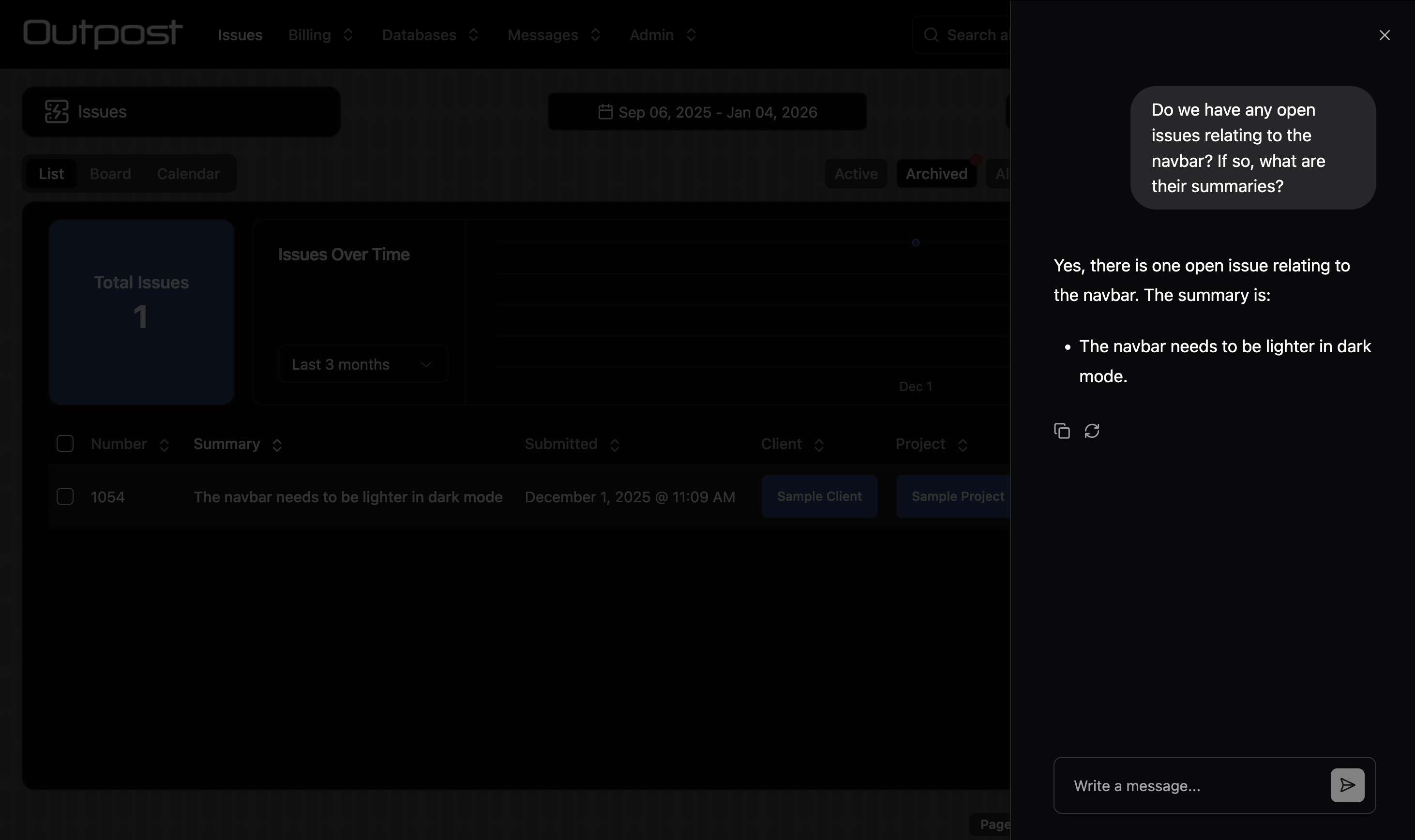
You can enable an AI chat bot for the collection. The chat bot uses Retrieval Augmented Generation (RAG) to converse with the user about the data in the collection.
| Property | Type | Description |
|---|---|---|
embedding | boolean | Set to true to save embeddings for records in this collection. This only works if the custom.setEmbedding hook has been enabled. |
chat.name | string | The name for the chat bot. |
chat.defaultQueryLimit | number | The number of records the LLM should retrieve for context. |
chat.roles | string[] | The roles that can view the chat bot. |
Only assign AI chat access to roles that have access to ALL fields used to calculate embeddings!
Array fields need a declared item type in the chat tool schema. Set values or itemType. An array field with neither is omitted from the chat tools.
Admin UI Config
Admin UI config is specified using the admin property.
hidden
boolean | (() => boolean | Promise<boolean>)
Return true to hide the collection in the Admin UI.
navbarPosition
number | (() => number)
The collection's position in the navbar.
titles
{ collection: string, record: string } |
(
    (
        context?: "permissions" | "search-all" | "relation-list",
        parentCollection?: CollectionSchema,
        parentRecord?: StokerRecord,
    ) => { collection: string; record: string } | Promise<{ collection: string; record: string }>
)
Human-readable labels for the collection. Only necessary if the root labels are not human-readable.
icon
React.FC | (() => React.FC | Promise<React.FC>)
An icon component for the collection. We recommend using Lucide icons, which are bundled with Stoker.
itemsPerPage
number | (() => number | Promise<number>)
The number of items to show per page.
statusField
{ field: string, active?: unknown[], archived?: unknown[] }
Define a field that will be used to sort records into "Active" and "Archived" lists.
For example: { field: "Status", active: ["Not Started", "In Progress"], archived: ["Completed"]}
| Property | Type | Description |
|---|---|---|
field | string | The field that defines the active / archived status. |
active | unknown[] | Values considered active. |
archived | unknown[] | Values considered archived. |
breadcrumbs
string[] | (() => string[] | Promise<string[]>)
Return an array of relational field names that will be used to show breadcrumbs at the top of the record page.
duplicate
boolean | (() => boolean | Promise<boolean>)
Return true to show the Duplicate button on the form page.
convert
type Convert = {
    collection: string
    convert: (record: StokerRecord) => Partial<StokerRecord> | Promise<Partial<StokerRecord>>
    roles?: string[]
}
Convert[] | (() => Convert[] | Promise<Convert[]>)
Converting a record creates a new record in the target collection and keeps the original.
Return an array of objects defining which collections records can be converted to. A "Convert" button will be shown on the form page.
| Property | Type | Description |
|---|---|---|
collection | string | The collection to convert records to. |
convert | (record: StokerRecord) => Partial<StokerRecord> | Promise<Partial<StokerRecord>> | A function that modifies the record before conversion. |
roles | string[] | The roles that can perform this conversion. |
defaultView
"list" | "cards" | "images" | "map" | "calendar" | (() => "list" | "cards" | "images" | "map" | "calendar")
The default view for the collection.
defaultRoute
string | (() => string)
The default route for the record page. Can be "edit", "files", a relation list collection name or a custom form page url.
defaultSort
{ field: string, direction?: "asc" | "desc" } |
(
    () => { field: string, direction?: "asc" | "desc" } |
    Promise<{ field: string, direction?: "asc" | "desc" }>
)
The default field to sort the list by.
secondarySort
{ field: string, direction?: "asc" | "desc" } |
(
    () => { field: string, direction?: "asc" | "desc" } |
    Promise<{ field: string, direction?: "asc" | "desc" }>
)
The secondary field to sort the list by. Only works for collections with preloadCache or access.serverReadOnly enabled.
searchOptions
SearchOptions | (() => SearchOptions)
Full text search options. For roles with the preload cache or access.serverReadOnly enabled, provide MiniSeach settings. For other roles, provide { hitsPerPage?: number } to specify the maximum number of results to retrieve from Algolia.
rangeSelectorValues
"range" | "week" | "month" | ("range" | "week" | "month")[] | (() => "range" | "week" | "month" | ("range" | "week" | "month")[])
The date range selector options to be shown to the user.
Only relevant when preloadCache.range is present.
defaultRangeSelector
"range" | "week" | "month" | (() => "range" | "week" | "month")
The default date range selector to be shown to the user.
Only relevant when preloadCache.range is present or a range filter has been applied.
disableRangeSelector
boolean | (() => boolean)
Disable the date range selector for the user.
restrictExport
string[] | (() => string[] | Promise<string[]>)
Restrict CSV export to the defined roles.
customListActions
type CustomListAction = {
    title: string
    icon?: React.FC<{ className?: string }>
    action: () => void | Promise<void>
    condition?: () => boolean
}
CustomListAction[] | (() => CustomListAction[] | Promise<CustomListAction[]>)
Provide custom actions that will be shown in a dropdown menu on the list page.
addRecordButtonOverride
(record?: StokerRecord) => void | Promise<void>
Provide a function that will override the default behaviour of opening the add record form.
hideCreate
boolean | ((relationList?: string) => boolean | Promise<boolean>)
Hide the add record button.
disableUpdate
boolean | ((operation: "create" | "update", record: StokerRecord) => boolean | Promise<boolean>)
Disable the edit record form.
This option only disables editing client side. Do not use it if you need to securely block record updates. Use restrictUpdate or operations instead.
onFormOpen
(
    operation: "create" | "update",
    record: StokerRecord,
    parentCollection?: string,
    parentRecord?: StokerRecord
) => void | Promise<void>
A hook that fires when the record form is opened.
When the "create" form is opened from within another record's relation list, the parent collection and parent record are provided.
onChange
(
    operation: "create" | "update",
    record: StokerRecord,
    previous: StokerRecord | undefined,
) => Partial<StokerRecord> | void | Promise<Partial<StokerRecord> | void>
A hook that fires whenever the form is updated. Optionally return an object with field updates.
live
boolean | (() => boolean | Promise<boolean>)
Set to true to have the form page live-update when the record is updated remotely. This can also be configured at the field-level.
Live forms reduce the risk of conflicts and are great for collaboration. However, on a live form remote updates will overwrite local changes. This introduces a risk of data loss. Choose wisely!
meta
{ title?: string, description?: string } |
(() => { title?: string, description?: string } | Promise<{ title?: string, description?: string }>)
Define a custom meta title and description for the collection's pages.
rowHighlight
type RowHighlight = {
    condition: (record: StokerRecord) => boolean
    className: string
    roles?: string[]
}
RowHighlight[] | (() => RowHighlight[])
Highlight rows in the list view.
| Property | Type | Description |
|---|---|---|
condition | (record: StokerRecord) => boolean | Return true to highlight the row for the given record. |
className | string | The Tailwind classes to apply to the highlighted row. |
roles | string[] | The user roles to highlight rows for. |
formButtons
type FormButton = {
    title: string
    icon?: React.FC<{ className?: string }>
    variant?: "default" | "destructive" | "outline" | "secondary" | "ghost" | "link"
    action: (
        operation: "create" | "update" | "update-many",
        formValues: StokerRecord,
        originalRecord?: StokerRecord,
    ) => void | Promise<void>
    condition?: boolean | ((operation: "create" | "update" | "update-many", record?: StokerRecord) => boolean)
    setIsLoading?: (isLoading: boolean) => void
}
FormButton[] | (() => FormButton[] | Promise<FormButton[]>)
Show custom buttons at the bottom of the edit record form.
| Property | Type | Description |
|---|---|---|
title | string | The title text for the custom button. |
icon | React.FC<{ className?: string }> | The icon shown on the button. |
variant | "default" | "destructive" | "outline" | "secondary" | "ghost" | "link" | The style of the button. |
action | (...) => void | Promise<void> | The function that fires when the button is clicked. |
condition | boolean | ((operation: ..., record?: StokerRecord) => boolean) | Show or hide the button. |
setIsLoading | (isLoading: boolean) => void | A loading callback that will be called when the button is pressed. |
formUpload
boolean | (() => boolean | Promise<boolean>)
Show a file upload button on the add record form.
formImages
boolean | (() => boolean | Promise<boolean>)
Show an image carousel at the top of the edit record form. All image files uploaded to the record will be displayed.
formLists
type FormList {
    collection: string
    fields: string[]
    sortField?: string
    sortDirection?: "asc" | "desc"
    label?: string
}
FormList[] | (() => FormList[] | Promise<FormList[]>)
Show relation lists directly on the edit record form page.
| Property | Type | Description |
|---|---|---|
collection | string | The collection to show the relation list for. |
fields | string[] | Which columns to show in the list. |
sortField | string | The field to sort records by. |
sortDirection | "asc" | "desc" | The direction to sort records by. |
label | string | The title for the relation list. |
fileOptions
type FileOptions {
    maxImageWidth?: number
    thumbnails: boolean
}
FileOptions[] | (() => FileOptions[] | Promise<FileOptions[]>)
| Property | Type | Description |
|---|---|---|
maxImageWidth | number | The maximum width for uploaded image files. Images above this size will be downscaled. |
thumbnails | boolean | Set to true to show thumbnails for images in the files list. |
customFields
type CustomField = {
    position?: number | ((record?: StokerRecord) => number)
    component?: React.FC
    props?: Record<string, unknown>
    condition?: (operation: "create" | "update" | "update-many", record?: StokerRecord) => boolean
}
CustomField[] | (() => CustomField[] | Promise<CustomField[]>)
Create custom form field components.
| Property | Type | Description |
|---|---|---|
position | number | ((record?: StokerRecord) => number) | The position of the custom component in the form. |
component | React.FC | The React component. |
props | Record<string, unknown> | Props to pass to the React component. |
condition | (operation: "create" | "update" | "update-many", record?: StokerRecord) => boolean | Show or hide the custom component. |
customRecordPages
type CustomRecordPage = {
    title: string
    icon?: React.FC<{ className?: string }>
    url: string
    component: React.FC<{
        record: StokerRecord | undefined
        collection: CollectionSchema
        components: any
        hooks: any
        utils: any
    }>
    props?: Record<string, unknown>
    condition?: (record: StokerRecord | undefined) => boolean
}
CustomRecordPage[] | (() => CustomRecordPage[] | Promise<CustomRecordPage[]>)
Create custom pages for the collection.
| Property | Type | Description |
|---|---|---|
title | string | The title for the custom page in the sidebar. |
icon | React.FC<{ className?: string }> | The icon shown in the sidebar. |
url | string | The URL segment that the page will load on. |
component | React.FC<...> | The custom component. |
props | Record<string, unknown> | Props to pass to the custom component. |
condition | (record: StokerRecord | undefined) => boolean | Show or hide the custom page. |
retriever
() => any | Promise<any>
Use this method to load data for use in your computed fields.
list
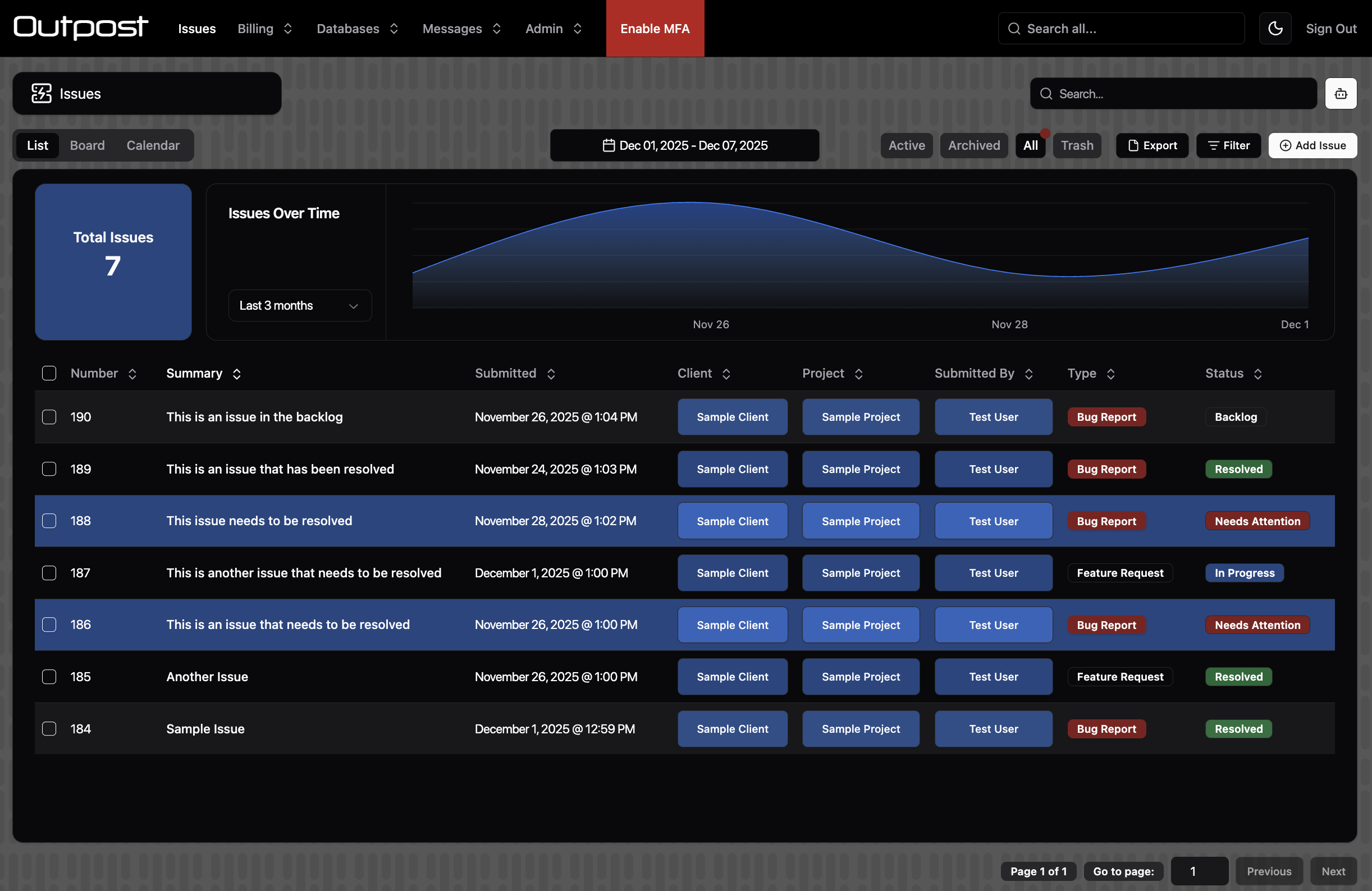
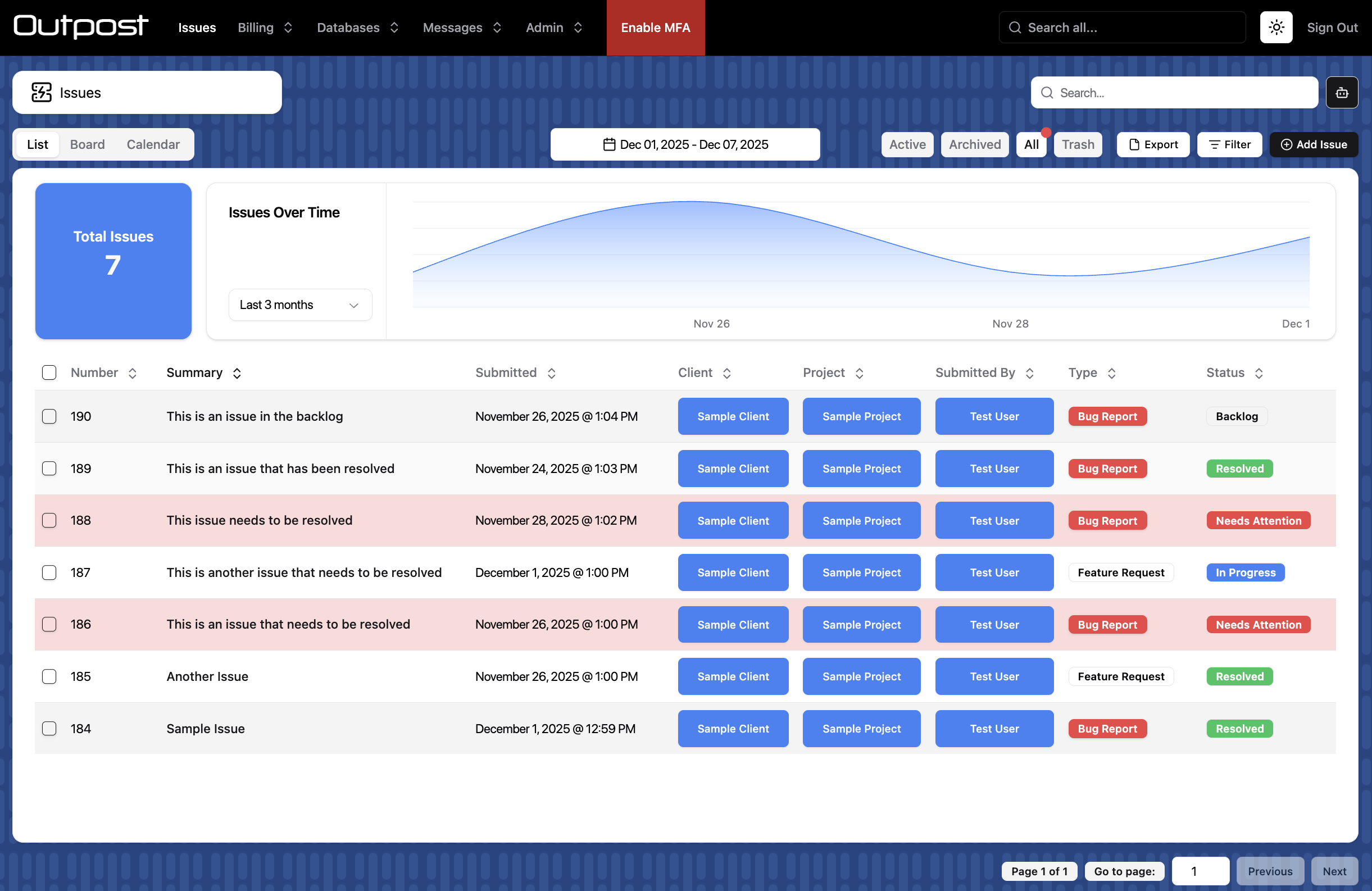
{ roles?: string[], title?: string } | (() => { title?: string } | Promise<{ title?: string }>)
| Property | Type | Description |
|---|---|---|
title | string | Customise the title for the list tab. Defaults to "List". |
roles | string[] | Limit which user roles can view the list. |
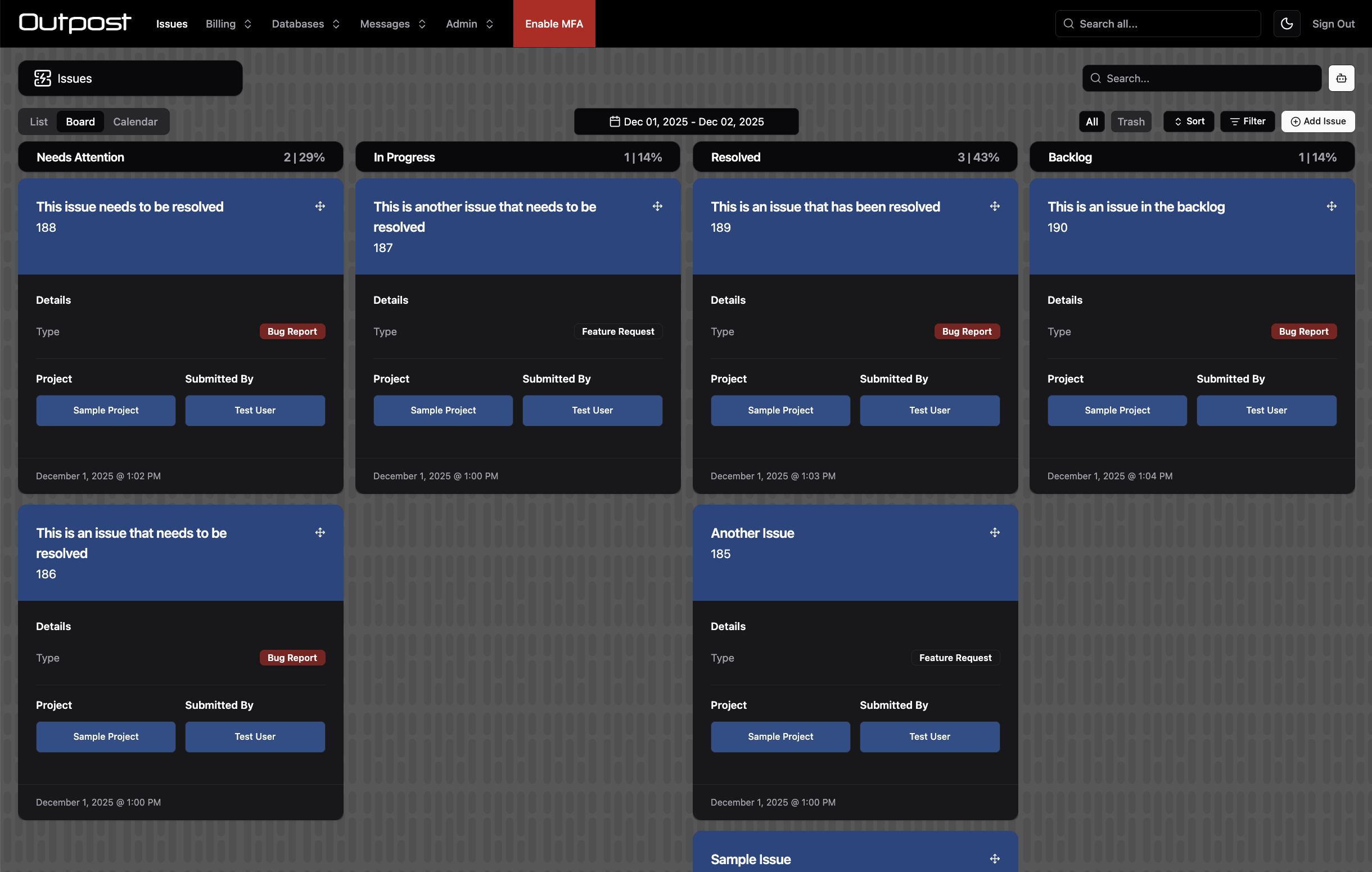
cards
Show a board view with drag and drop and infinite scroll.
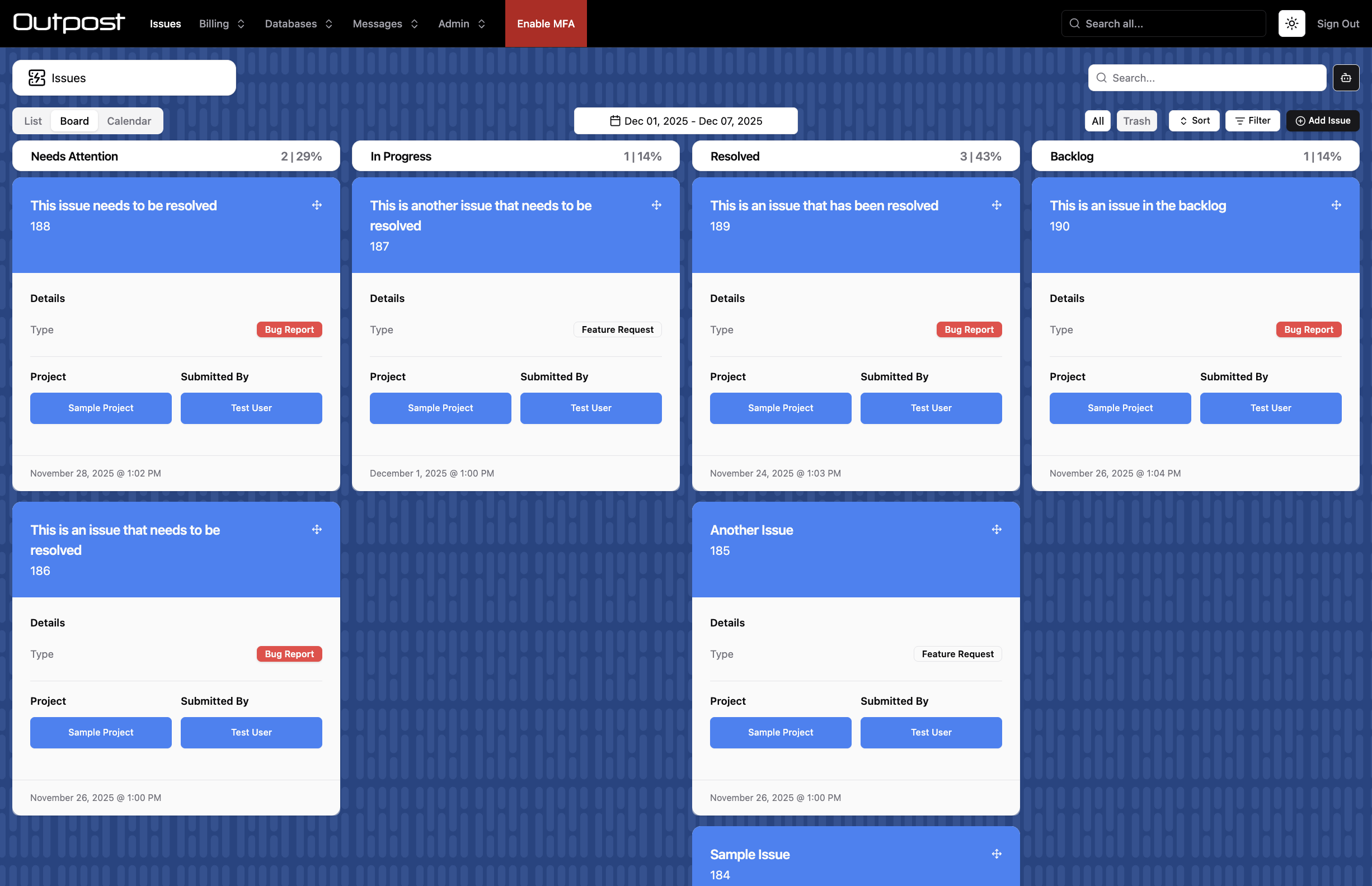
type CardsConfig = {
    title?: string
    roles?: string[]
    statusField?: string
    excludeValues?: string[] | number[]
    headerField: string
    maxHeaderLines?: 1 | 2
    sections: {
        title?: string
        fields: string[]
        blocks?: boolean
        large?: boolean
        maxSectionLines?: 1 | 2 | 3 | 4
        collapse?: "sm" | "md" | "lg" | "xl" | "2xl" | ((record?: StokerRecord) => "sm" | "md" | "lg" | "xl" | "2xl")
    }[]
    footerField?: string
    maxFooterLines?: 1 | 2
    cardClass?: string
}
CardsConfig | (() => CardsConfig | Promise<CardsConfig>)
| Property | Type | Description |
|---|---|---|
title | string | Customise the title for the board tab. Defaults to "Board". |
roles | string[] | Limit which user roles can view the board. |
statusField | string | The field that defines the board columns. Must be a String or Number field with values, or a Boolean field. Not required if admin.statusField has already been set. |
excludeValues | string[] | number[] | Exclude status values from the board. |
headerField | string | The header field shown on cards. |
maxHeaderLines | 1 | 2 | The number of lines for the header field text. |
sections | object[] | Sections to display on cards. |
footerField | string | The footer field shown on cards. |
maxFooterLines | 1 | 2 | The number of lines for the footer field text. |
cardClass | string | Tailwind classes to apply to the card component. |
For sections, each entry supports:
| Property | Type | Description |
|---|---|---|
title | string | The title for the section. |
fields | string[] | The fields to display in the section. |
blocks | boolean | Show multiple columns of fields, rather than listing fields down the card vertically. |
large | boolean | Show a large field value. |
maxSectionLines | 1 | 2 | 3 | 4 | The number of lines for field text. |
collapse | responsive size or callback | Only relevant when blocks is set to true. Hide the outermost block at this screen size. Helps with responsiveness. |
images
type ImagesConfig = {
    title?: string
    roles?: string[]
    imageField: string
    size: "sm" | "md" | "lg" | "xl"
    maxHeaderLines?: 1 | 2
    customComponent?: {
        component: React.FC<{
            record: StokerRecord | undefined
            parentRecord?: StokerRecord
            collection: CollectionSchema
            parentCollection?: CollectionSchema
            components: any
            hooks: any
            utils: any
        }>
        height: number
        condition?: (parentCollection?: CollectionSchema, parentRecord?: StokerRecord, isAssigning?: boolean) => boolean
    }
}
ImagesConfig | (() => ImagesConfig | Promise<ImagesConfig>)
Show a list of image cards with infinite scroll.
| Property | Type | Description |
|---|---|---|
title | string | Customise the title for the images tab. Defaults to "Pics". |
roles | string[] | Limit which user roles can view the images page. |
imageField | string | The field that contains the image URL for the record. Must be a String field. |
size | "sm" | "md" | "lg" | "xl" | The image size. |
maxHeaderLines | 1 | 2 | The number of lines for the header field text. |
customComponent | object | An optional custom component shown above each image. |
map
Show a map view.
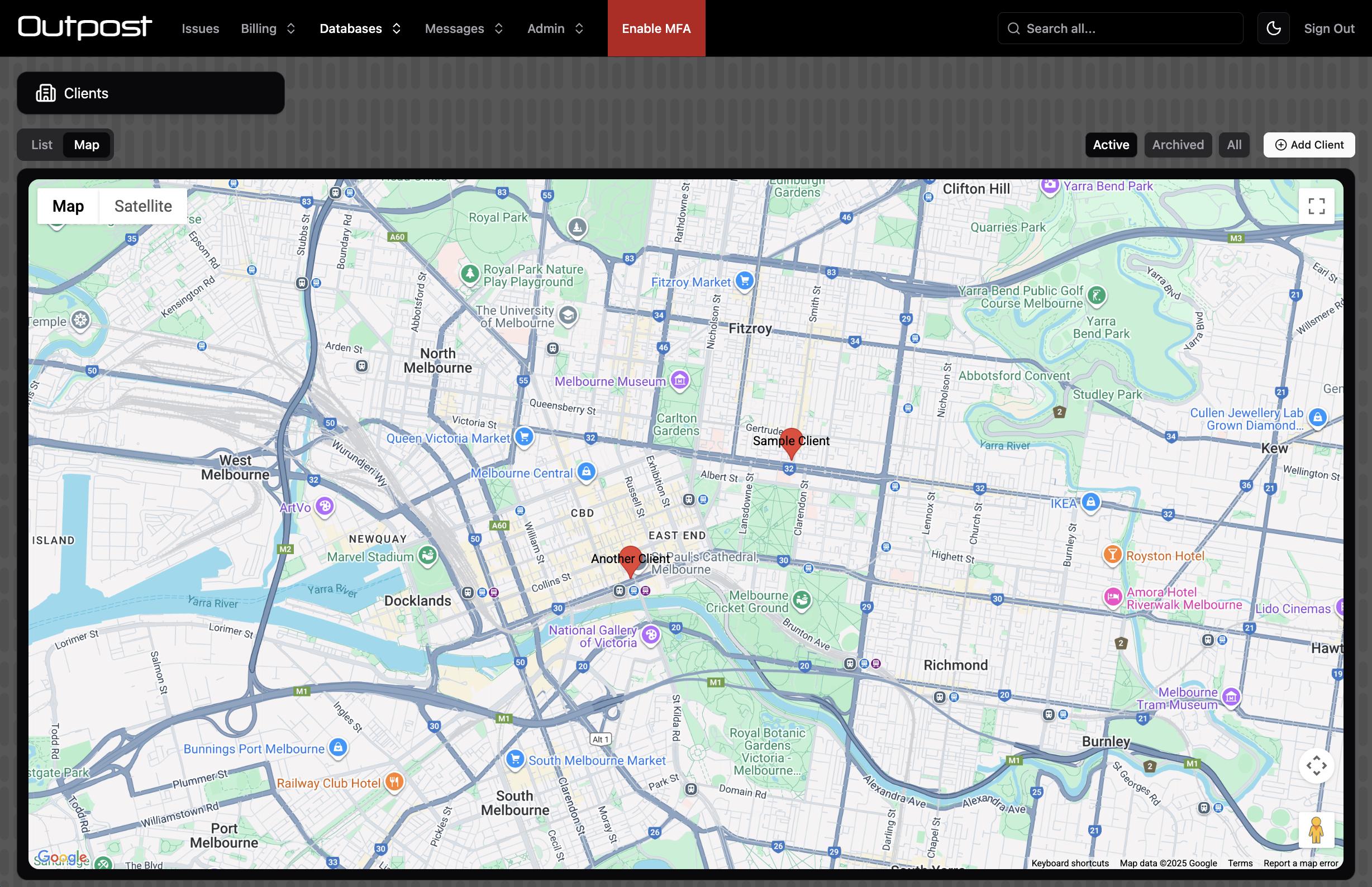
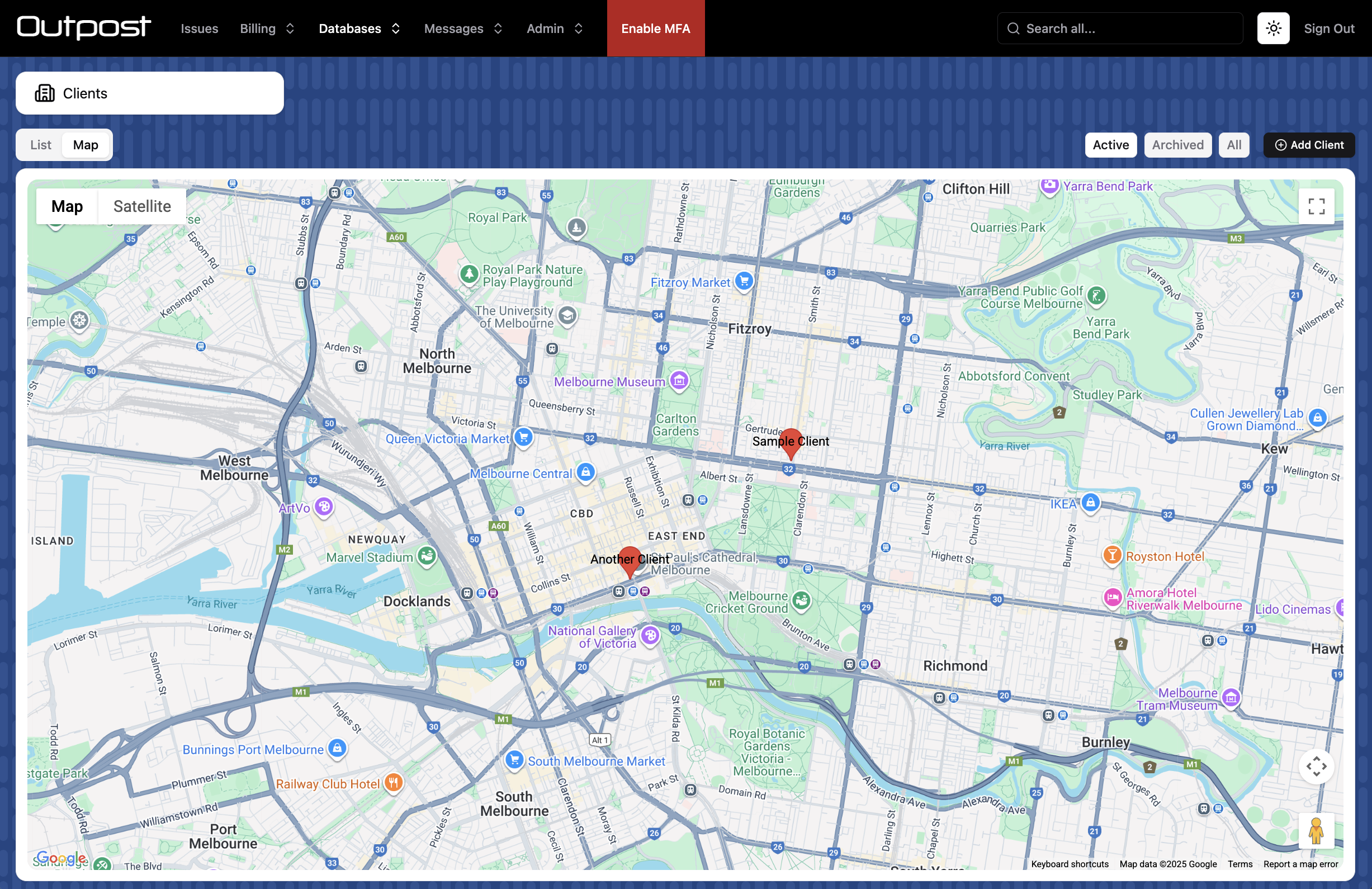
type MapConfig = {
    title?: string
    roles?: string[]
    coordinatesField?: string
    addressField?: string
    center: {
        lat: number
        lng: number
    }
    zoom: number
    noLocation?: {
        title: string
    }
}
MapConfig | (() => MapConfig | Promise<MapConfig>)
| Property | Type | Description |
|---|---|---|
title | string | Customise the title for the map tab. Defaults to "Map". |
roles | string[] | Limit which user roles can view the map page. |
coordinatesField | string | The field containing coordinates. Must be an Array field. |
addressField | string | Alternatively, provide a String field containing an address. |
center | { lat: number, lng: number } | The starting coordinates for the map. |
zoom | number | The starting zoom value for the map. |
noLocation | { title: string } | Show a column of records without coordinates or an address. Records can be dragged onto the map (only when coordinatesField is provided). |
calendar
type CalendarConfig = {
    title?: string
    roles?: string[]
    startField: string
    endField?: string
    additionalFields?: string[]
    allDayField?: string
    eventTitle?: (record: StokerRecord) => string
    color?: string | ((record: StokerRecord) => string)
    filterRecords?: (record: StokerRecord) => boolean
    fullCalendarLarge?: CalendarOptions
    fullCalendarSmall?: CalendarOptions
    resourceField?: string
    resourceTitleField?: string
    unscheduled?: {
        title: string
        roles?: string[]
    }
    additionalCollections: string[]
    dataStart?: { days: number } | { weeks: number } | { months: number } | { years: number }
    dataEnd?: { days: number } | { weeks: number } | { months: number } | { years: number }
    dataStartOffset?: { days: number } | { weeks: number } | { months: number } | { years: number }
    dataEndOffset?: { days: number } | { weeks: number } | { months: number } | { years: number }
}
CalendarConfig | (() => CalendarConfig | Promise<CalendarConfig>)
Show a calendar view.
| Property | Type | Description |
|---|---|---|
title | string | Customise the title for the calendar tab. Defaults to "Calendar". |
roles | string[] | Limit which user roles can view the calendar page. |
startField | string | Timestamp field specifying the start date. |
endField | string | Timestamp field specifying the end date. If omitted, the start date is used. |
additionalFields | string[] | Additional Timestamp fields to include as all-day events. |
allDayField | string | Boolean field indicating whether records are all-day. |
eventTitle | (record: StokerRecord) => string | A custom title for the provided record's event on the calendar. |
color | string | ((record: StokerRecord) => string) | The color for the provided record's event on the calendar. |
filterRecords | (record: StokerRecord) => boolean | An optional function that determines whether a record should be displayed on the calendar. This filter only runs in the client, so it should not be used for access control purposes. |
fullCalendarLarge | CalendarOptions | Fullcalendar options for desktop screen sizes. |
fullCalendarSmall | CalendarOptions | Fullcalendar options for mobile screen sizes. |
resourceField | string | Relational field specifying a parent resource. Used for Fullcalendar features that require "resources". |
resourceTitleField | string | Field in the resourceField collection that acts as the resource title. |
unscheduled | object | Show a column of unscheduled records. Only relevant if preloadCache.range is present for the user's role. Records can be dragged onto the calendar. |
additionalCollections | string[] | Additional collections to show on the calendar. Additional collections will only work when the preload cache is enabled for the user's role for the given collection. |
dataStart | object | How far into the past to load records for. |
dataEnd | object | How far into the future to load records for. |
dataStartOffset | object | Threshold at which more past records will be loaded. |
dataEndOffset | object | Threshold at which more future records will be loaded. |
When both the preload cache range and the calendar are enabled, the system will calculate the maximum possible date range from the start and end dates for each. It will then load data for the calculated date range. You may want to keep the initial date ranges for each small, in order to reduce the amount of data initially loaded.
These limitations apply if you are NOT using the preload cache:
- Records will appear on the calendar based on their start date only.
- The calendar start date field must be a required field.
- If you use a range filter, its field must match the calendar start date field.
The calendar requires a Fullcalendar license
filters
type SelectFilter = {
    type: "select"
    field: string
    title?: string | (() => string)
    roles?: string[]
    style?: "select" | "radio" | "buttons"
    titles?: (
        value: string,
        relationCollection?: CollectionSchema,
        relationParent?: StokerRecord,
        isAssigning?: boolean,
    ) => string
    filterValues?: (
        value: boolean | string | number | undefined,
        relationCollection?: CollectionSchema,
        relationParent?: StokerRecord,
        isAssigning?: boolean,
    ) => boolean
    defaultValue?: string | number | ((
        parentCollection: CollectionSchema,
        parentRecord?: StokerRecord,
        isAssigning?: boolean,
    ) => string | number)
    condition?: (
        parentCollection?: CollectionSchema,
        parentRecord?: StokerRecord,
        isAssigning?: boolean,
    ) => boolean
}

type RelationFilter = {
    type: "relation"
    field: string
    title?: string | (() => string)
    roles?: string[]
    constraints?: [string, "==" | "in", unknown][]
}

type RangeFilter = {
    type: "range"
    field: string
    selector?:
        | "range"
        | "week"
        | "month"
        | ("range" | "week" | "month")[]
        | (() => "range" | "week" | "month" | ("range" | "week" | "month")[])
    startOffsetDays?: number
    startOffsetHours?: number
    endOffsetDays?: number
    endOffsetHours?: number
}
Filter[]
Return an array of filter objects (specified above). Filters will appear in the right-hand-side filter drawer on the list page.
"Select filters" allow you to filter the list by a field with values set.
"Relation filters" allow you to filter by a related field. The "constraints" option lets you filter the list of related values using a Firestore where() query.
"Range filters" allow you to filter by a Timestamp field. See preloadCache.range for more information on what the options do.
titleCount
boolean | (() => boolean | Promise<boolean>)
Display a counter in the title bar showing the number of items in the list.
metrics
type Metric = {
    type: "sum" | "average" | "count" | "custom"
    field?: string
    title?: string
    roles?: string[]
    decimal?: number
    prefix?: string
    suffix?: string
    textSize?: "text-xs" | "text-sm" | "text-base" | "text-lg" | "text-xl" | "text-2xl" | "text-3xl"
    compact?: boolean
    formula?: (records: StokerRecord[]) => number | string
}

type Chart = {
    type: "area"
    dateField: string
    metricField1?: string
    metricField2?: string
    title?: string
    roles?: string[]
    defaultRange: "90d" | "30d" | "7d"
    currency?: string | (() => string)
}
(Metric | Chart)[] | (() => (Metric | Chart)[] | Promise<(Metric | Chart)[]>)
Show metrics (numerical counters) and a chart at the top of the list page.
We recommend 1-2 metrics and a chart.
For "custom" metrics, use the formula method to calculate the value to display.
Metric supports:
| Property | Type | Description |
|---|---|---|
type | "sum" | "average" | "count" | "custom" | The metric type. |
field | string | The field to aggregate. Not required for count or custom. |
title | string | The title shown above the metric. |
roles | string[] | Limit which user roles can view the metric. |
decimal | number | Maximum decimal places to display. |
prefix | string | Prefix text, for example a currency symbol. |
suffix | string | Suffix text, for example units. |
textSize | "text-xs" | "text-sm" | "text-base" | "text-lg" | "text-xl" | "text-2xl" | "text-3xl" | Tailwind text size for the metric value. |
compact | boolean | Compact the metric vertically. The metric will be displayed as a single-line card showing the title and value together. |
formula | (records: StokerRecord[]) => number | string | Custom metric calculation. |
Chart supports:
| Property | Type | Description |
|---|---|---|
type | "area" | The chart type. |
dateField | string | The date field used to group points. |
metricField1 | string | First metric field. |
metricField2 | string | Optional second metric field. |
title | string | Title shown above the chart. |
roles | string[] | Limit which user roles can view the chart. |
defaultRange | "90d" | "30d" | "7d" | Default chart date range. |
currency | string | (() => string) | Currency symbol to display. |
Collection Hooks
When importing modules that are web-only or server-only, be sure to:
- Install them using
external.packages.json - Guard their use by wrapping code in:
if(sdk === "web") {...your web code goes here...}if(sdk === "node") {...your server code goes here...}
- Import them dynamically i.e.
await import("firebase/firestore")
This lets you write web and server code in the same file.
You can also write your own modules in the src/web and src/node folders and import modules statically there. In this case, you can only use one import per line i.e. import { getAuth } from "firebase/auth"
Server code protection: During the build process, server-only code blocks are automatically stripped from the client bundle:
if(sdk === "node")blocks are removedelseandelse ifblocks followingif (sdk === "web")guards are removed- Code in
src/nodeis stripped to export names only
Important: Code outside of these guard blocks WILL be sent to the client and will run on the client.
For highly sensitive server operations, consider using custom cloud functions instead.
Auto-incremented numbers will be "Pending" in hooks.
In the Web SDK, postWrite, postError and postOperation hooks will not fire if the window is closed before the operation completes. Consider using a cloud trigger function instead.
- Hooks will not run on retries for offline writes and unique field auto-correction.
preOperation
({
    operation: "read" | "create" | "update" | "delete"
    data?: StokerRecord
    recordId?: string
    context?: any
    batch?: WriteBatch
    originalRecord?: StokerRecord
}) => boolean | void | Promise<boolean | void>
Fires before a read or write operation.
Return false to cancel the operation.
preRead
({
    context: any
    refs: unknown[]
    multiple?: boolean
    listener?: boolean
}) => void | Promise<void>
Fires before a read operation.
preValidate
({
    operation: "create" | "update"
    data: StokerRecord
    context: any
    batch?: WriteBatch
    originalRecord?: StokerRecord
}) => { valid: boolean; message?: string } | Promise<{ valid: boolean; message?: string }>
Fires at write validation time. This is where you can define custom validation logic.
Return an object with a boolean indicating whether validation passed, and a message to display to the user if validation has failed.
When serverWriteOnly is set to true, this hook will fire in the Web SDK before the write is handed off to the Node SDK. This lets you run web code such as warning dialogs before the write is sent to the server. Be sure to guard web code in if(sdk === "web") to ensure it doesn't run on the server.
preWrite
({
    operation: "create" | "update" | "delete"
    data: StokerRecord
    recordId: string
    context: any
    batch?: WriteBatch
    originalRecord?: StokerRecord
}) => boolean | void | Promise<boolean | void>
Fires before a write operation.
Return false to cancel the operation.
preDuplicate
({ data: Partial<StokerRecord> }) => boolean | void | Promise<boolean | void>
Fires before a duplicate operation in the Admin UI.
Return false to cancel the operation.
postOperation
({
    operation: "read" | "create" | "update" | "delete"
    data?: StokerRecord
    recordId?: string
    context?: any
    retry?: boolean
    originalRecord?: StokerRecord
}) => void | Promise<void>
Fires after a read or write operation.
postRead
({
    context: any
    refs: unknown[]
    record: StokerRecord | undefined
    listener?: boolean
}) => void | Promise<void>
Fires after a read operation.
postWrite
({
    operation: "create" | "update" | "delete"
    data: StokerRecord
    recordId: string
    context: any
    retry?: boolean
    originalRecord?: StokerRecord
}) => void | Promise<void>
Fires after a write operation.
postWriteError
({
    operation: "create" | "update" | "delete"
    data: StokerRecord
    recordId: string
    context: any
    error: unknown
    batch?: WriteBatch
    retry?: boolean
    retries?: number
    originalRecord?: StokerRecord
}) => void | Promise<void>
Fires when a write operation encounters an error.
This hook may fire multiple times per write, so be sure to write idempotent code.
preFileAdd
({
    record: StokerRecord
    fullPath: string
    filename: string
    permissions: FilePermissions
}) => boolean | void | Promise<boolean | void>
Fires before a file is uploaded.
Return false to cancel the operation.
preFileUpdate
({
    record: StokerRecord
    update:
        { type: "rename"; oldPath: string; newPath: string } |
        {
            type: "permissions"
            path: string
            originalPermissions: FilePermissions
            permissions: FilePermissions
        }
}) => boolean | void | Promise<boolean | void>
Fires before a file is updated.
Return false to cancel the operation.
postFileAdd
({
    record: StokerRecord
    fullPath: string
    filename: string
    permissions: FilePermissions
}) => void | Promise<void>
Fires after a file is uploaded.
postFileAddError
({
    record: StokerRecord
    fullPath: string
    filename: string
    permissions: FilePermissions
    error: unknown
}) => void | Promise<void>
Fires when a file upload fails.
postFileUpdate
({
    record: StokerRecord
    update:
        { type: "rename"; oldPath: string; newPath: string } |
        {
            type: "permissions"
            path: string
            originalPermissions: FilePermissions
            permissions: FilePermissions
        }
}) => void | Promise<void>
Fires after a file is updated.
setEmbedding
({ record: StokerRecord }) => string | Promise<string>
Calculate an embedding value for the record.
Only assign AI chat access to roles that have access to ALL fields used to calculate embeddings!